
Cloud Bookkeeping vs Traditional Bookkeeping: Which Is Right for Your Business?

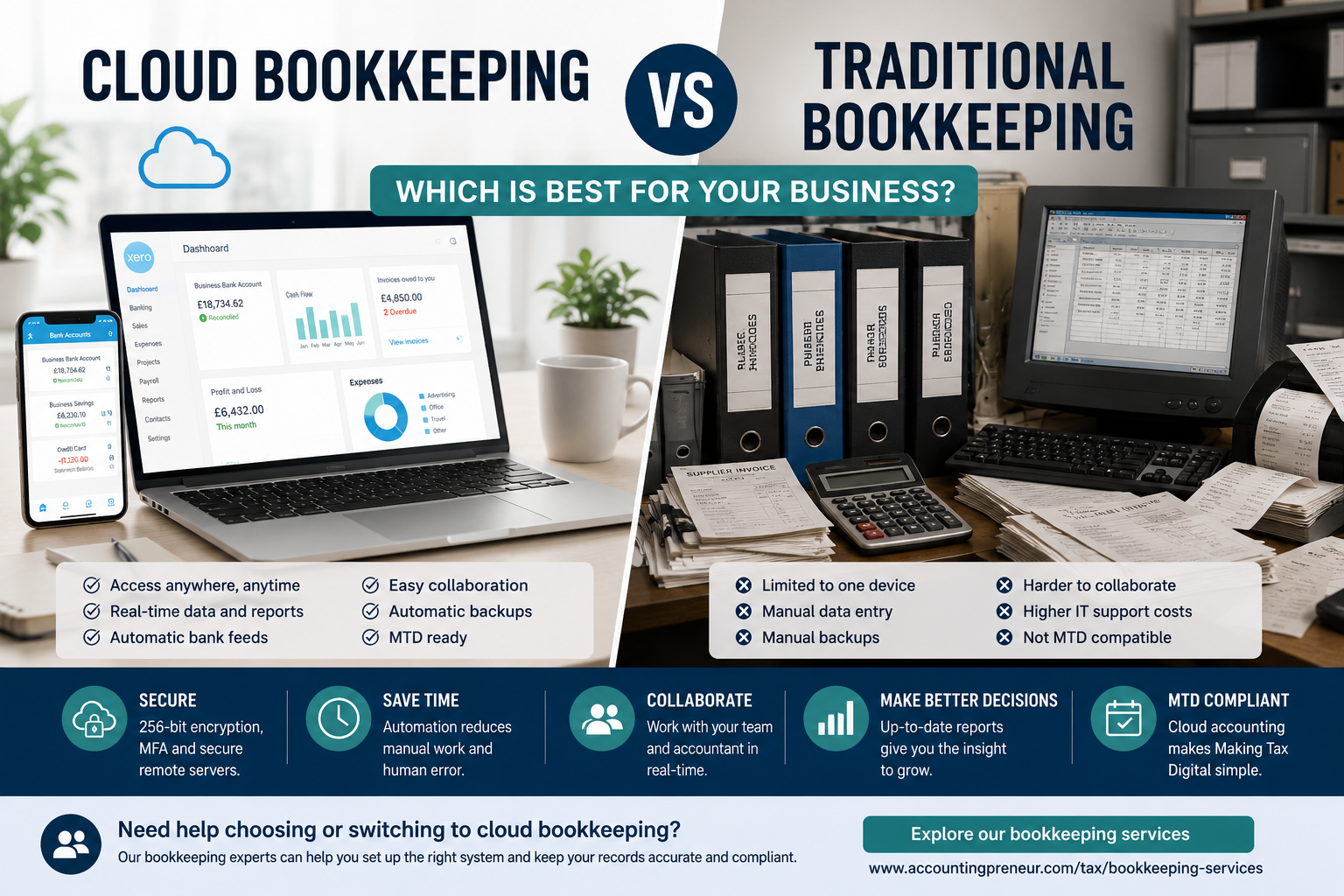
Cloud Bookkeeping vs Traditional Bookkeeping: Which Is Right for Your Business?
For most small businesses, cloud bookkeeping is now the more practical choice. It provides access to live financial information, reduces repetitive administration and makes it easier to work with your bookkeeper or accountant.
Traditional bookkeeping can still suit certain businesses, particularly those with unreliable internet access or strict requirements to keep financial data on their own premises. However, these situations are becoming less common as cloud accounting software becomes more secure, flexible and widely used.
This guide compares cloud bookkeeping with traditional bookkeeping across cost, security, accessibility, automation, collaboration and Making Tax Digital compliance.
What Is Cloud Bookkeeping?
Cloud bookkeeping means managing your financial records through accounting software hosted online. Rather than installing the software and storing all your data on one computer, you access your accounts through a secure browser or mobile application.
Popular cloud accounting platforms used by UK businesses include Xero, QuickBooks Online and FreeAgent. These platforms allow business owners, bookkeepers and accountants to work from the same live financial data.
The main benefits of cloud bookkeeping include:
- Access to current financial information from different devices
- Automatic software updates and data backups
- Bank feeds that import transactions directly
- Digital receipt capture and document storage
- Access for multiple authorised users
- Easier collaboration with bookkeeping and accounting professionals
Businesses that do not want to manage the software themselves can use professional bookkeeping services while still benefiting from cloud-based records and reporting.
What Is Traditional Bookkeeping?
Traditional bookkeeping usually involves paper records, spreadsheets or accounting software installed on a specific desktop computer.
The business is responsible for maintaining the software, completing updates and backing up its own financial data. Records may need to be exported and sent to an accountant, rather than accessed through a shared online system.
Traditional bookkeeping may still be appropriate where internet access is unreliable or where a business has a genuine operational requirement to keep financial records stored locally.
However, for many small businesses, traditional systems involve more manual entry, greater reliance on individual devices and fewer opportunities to automate routine work.
Cloud Bookkeeping vs Traditional Bookkeeping: The Main Differences
Access To Financial Information
Cloud accounting software allows authorised users to access financial information through an internet connection. This means a business owner can check unpaid invoices, review cash flow or approve transactions while working away from the office.
Traditional accounting software is normally tied to the computer on which it is installed. Remote access may be possible, but it generally requires additional technical setup.
Best for accessibility: cloud bookkeeping.
Software Costs
Cloud accounting software is generally charged through a monthly subscription. The cost varies according to the platform, number of users and features required.
Desktop accounting software may involve an upfront licence fee, together with charges for upgrades, technical support and data backups.
It is important to consider total ownership costs rather than only the advertised software price. A traditional system may also require IT support, local storage and time spent carrying out manual updates.
Best for predictable monthly costs: cloud bookkeeping.
Data Security
Reputable cloud accounting providers use security measures such as data encryption, multi-factor authentication, user permissions and activity logs.
They also maintain remote backups, reducing the risk of losing financial information if a laptop is damaged, stolen or affected by hardware failure.
Traditional bookkeeping can also be secure, but this depends heavily on the business maintaining appropriate local controls. Weak passwords, missed backups or an unprotected computer can place financial records at risk.
Whichever method you use, staff access should be restricted according to role and multi-factor authentication should be enabled where available.
Best for managed security and backup: cloud bookkeeping.
Automation
Automation is one of the clearest advantages of cloud bookkeeping.
Bank feeds can import transactions directly into the software. Receipt capture tools can extract details from invoices and receipts, while recurring invoices and payment reminders can be scheduled automatically.
These features can significantly reduce manual data entry and make it easier to keep records current.
Traditional accounting systems may offer some automation, but older desktop software and spreadsheet-based processes generally require more manual work.
Best for reducing bookkeeping administration: cloud bookkeeping.
Collaboration
Cloud bookkeeping allows several authorised users to work from the same set of live records.
Your bookkeeper can reconcile transactions, your accountant can review the figures and you can check the latest reports without exchanging copies of files by email.
User permissions can be adjusted so each person only sees the information needed for their role.
With traditional bookkeeping, accountants may need to wait for files to be exported or delivered before they can review the accounts. This can delay work and create confusion over which file is the latest version.
Best for collaboration: cloud bookkeeping.
Updates And Maintenance
Cloud accounting providers normally apply software updates automatically. This means users receive security updates, feature improvements and changes relating to current tax requirements without installing new versions manually.
Traditional software may require manual updates and licence renewals. Failing to update the system can create compatibility problems and leave businesses using outdated features.
Best for low-maintenance software: cloud bookkeeping.
Cloud Bookkeeping And Making Tax Digital
Making Tax Digital requires affected businesses and individuals to keep digital records and submit information using compatible software.
Cloud accounting software can make this process easier because transactions, receipts and VAT records are already stored digitally.
This does not mean every business must use a specific cloud platform, but the software must meet the relevant HMRC requirements for the taxes involved.
If you're preparing for Making Tax Digital, you may also find our guide to Making Tax Digital Explained for Small Businesses helpful.
Businesses registered for VAT can also use our VAT services for help maintaining digital records and preparing compliant VAT returns.
Further information is available through HMRC’s Making Tax Digital for Income Tax guidance.
Is Cloud Bookkeeping Secure?
Cloud bookkeeping can be secure when you choose an established provider and configure the account correctly.
Before selecting software, check whether it provides:
- Data encryption
- Multi-factor authentication
- Secure backups
- User permissions
- Audit logs
- Clear data protection and privacy policies
Businesses must also take responsibility for their own security. Use strong, unique passwords, remove access when employees leave and avoid sharing login details between users.
No system is entirely risk-free, but locally stored financial records are not automatically safer. A desktop computer without regular backups or adequate protection may create a greater risk than a properly managed cloud platform.
What Happens If Your Internet Connection Fails?
The main practical disadvantage of cloud bookkeeping is its reliance on internet access.
If your connection goes down, access may be temporarily unavailable. Some platforms offer limited mobile or offline functionality, but this varies between providers.
For most businesses, a short outage is an inconvenience rather than a serious operational problem. Businesses in areas with consistently poor connectivity may prefer a desktop system or maintain a backup internet connection.
Backup And Disaster Recovery
Cloud accounting systems usually back up financial data automatically. If a laptop is lost or an office is damaged, authorised users can sign in through another device.
Traditional systems rely on the business making regular backups and storing them securely. If those backups are incomplete, stored on the same computer or never tested, a hardware failure could result in substantial data loss.
Whichever bookkeeping method you choose, you should understand how your data is backed up, how frequently this happens and how records would be restored after an incident.
Which Cloud Accounting Software Is Best?
There is no single cloud accounting platform that is right for every business.
Xero, QuickBooks Online and FreeAgent are widely used by UK small businesses. Each provides functions such as bank feeds, invoicing, financial reporting and digital record keeping, but their pricing and features differ.
When comparing software, consider:
- Whether it supports your VAT and Making Tax Digital requirements
- The number of users who need access
- Bank feed availability
- Payroll and payment integrations
- Receipt capture features
- Reporting requirements
- Support from your bookkeeper or accountant
- The overall cost as your business grows
If you're already using cloud software but struggling to stay on top of the monthly admin, our Monthly Bookkeeping Checklist offers a simple routine to keep your records accurate throughout the year.
Your accountant or bookkeeper may already work with a preferred platform, so it is worth discussing the decision before subscribing.
Migrating From Traditional To Cloud Bookkeeping
Moving to cloud accounting should be planned carefully, particularly where you have several years of financial data or a complicated chart of accounts.
A typical migration process includes:
- Choosing suitable cloud accounting software
- Deciding how much historic data should be transferred
- Reviewing and cleaning the existing records
- Mapping the old chart of accounts to the new system
- Importing customers, suppliers and balances
- Connecting bank accounts and relevant applications
- Checking that the imported figures reconcile correctly
- Training the people who will use the new software
Keep a secure copy of your original records until the migration has been checked thoroughly. Businesses with complex records should consider professional support rather than attempting the move without guidance.
Scalability And Integrations
Cloud bookkeeping is often easier to scale as a business grows.
Additional users can usually be added without installing software on new computers. Cloud platforms can also integrate with payment systems, ecommerce platforms, expense applications, payroll tools and customer relationship management software.
Traditional systems may have fewer integration options and can become more difficult to manage as transaction volumes and reporting requirements increase.
If your business employs staff, integrated payroll services can help ensure wage costs and payroll liabilities are recorded accurately in your accounts.
When Traditional Bookkeeping May Still Be Suitable
Traditional bookkeeping may still make sense when:
- Your business operates in an area with unreliable internet access
- You have a genuine requirement to store financial information on site
- Your bookkeeping needs are very limited
- You already use a stable desktop system that meets your current requirements
- The cost and disruption of migration would outweigh the immediate benefits
Which Bookkeeping Method Should Your Business Choose?
Cloud bookkeeping is generally the stronger option when you need live access, automated bank feeds, shared records and a system that can grow with your business.
Traditional bookkeeping may remain suitable where internet availability is poor or local data storage is an essential operational requirement.
Businesses moving away from spreadsheets often also benefit from reading our guide on common bookkeeping mistakes before switching systems.
When deciding, it helps to consider:-
- How many transactions you process each month
- Whether several people need access
- Whether you are VAT registered
- How you currently store invoices and receipts
- Whether your accountant needs regular access
- Your payroll and reporting requirements
- Your future growth plans
For most UK small businesses, cloud bookkeeping offers the best balance of convenience, security, collaboration and automation.
Frequently Asked Questions
Can accountants work with cloud and traditional bookkeeping systems?
Yes. Accountants and bookkeepers can work with either method. However, cloud software often makes collaboration easier because authorised professionals can review live records without waiting for files to be exported.
Can I export my data from cloud accounting software?
Most established cloud accounting platforms allow users to export reports and financial information. Check the provider’s export and data retention options before subscribing.
What are the disadvantages of cloud accounting?
The main disadvantages are reliance on an internet connection, ongoing subscription costs and dependence on an external software provider. Businesses must also manage user permissions and account security carefully.
Is cloud bookkeeping suitable for sole traders?
Yes. Cloud bookkeeping can help sole traders organise income and expenses, store receipts and prepare information for Self Assessment.
Our Self Assessment tax return services can help ensure your bookkeeping records are reflected accurately in your return.
Is AI replacing bookkeepers?
No. AI can help automate data entry, transaction matching and routine checks, but professional judgement is still needed to correct errors, apply accounting rules and interpret financial information.
What is a common bookkeeping mistake?
Mixing personal and business transactions is one of the most common bookkeeping mistakes. Using a dedicated business bank account and reconciling it regularly makes records easier to manage.
Final Thoughts
Cloud bookkeeping is the best all-round option for most modern small businesses. It provides easier access, stronger collaboration, automatic backups and tools that reduce repetitive bookkeeping work.
Traditional bookkeeping still has a place, but mainly in businesses with specific connectivity, security or operational requirements.
The right software is only part of the answer. Your financial records still need to be reviewed, reconciled and maintained accurately.
AccountingPreneur provides practical bookkeeping support for small businesses, including help with cloud accounting software, transaction reconciliation, VAT records and financial reporting.
Speak to our accountants in Fitzrovia to discuss the right bookkeeping approach for your business.
Get in touch today to see how we can help you!
Contact us




.png)
-min.png)

.png)


